Elliott Automatically Adds Destination Location for Transfer If Item Is Not Stocked
Release Date: 09/22/2020
Version: 7.x & Up
Q - I noticed that if an item on transfer order is not stocked at the destination location, Elliott allows the user to enter the line. I think that this should not be allowed. Elliott of course checks that the item is stocked at the from location.
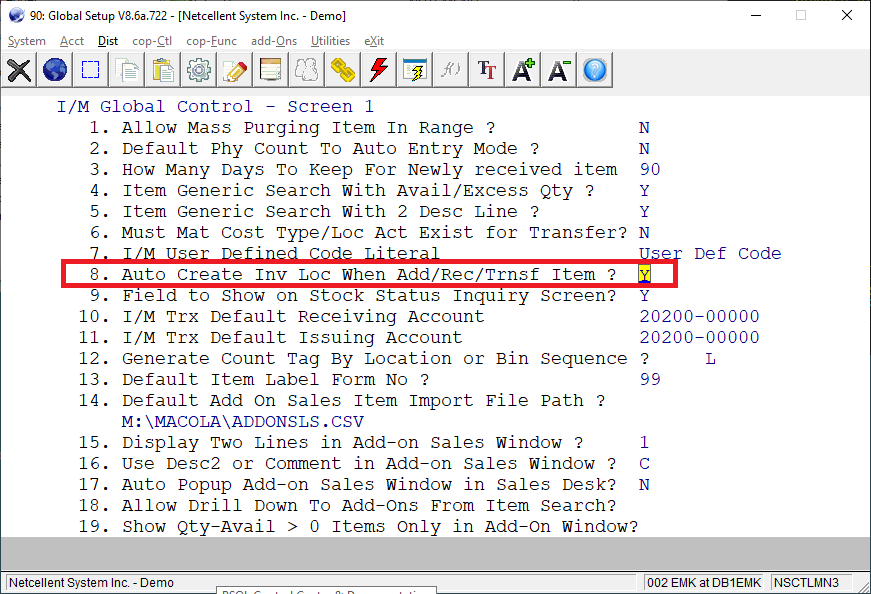
A - There’s a Global Setup flag in Dist -> I/M Global Control -> 8. Auto Create Inv Loc When Add/Rec/Trnsf Item ?
You can set this flag to “N” to disable this feature. See sample screen below:
The user followed up with the following question:
Shouldn't Elliott stop the user if the item is not stocked at the destination?
Here is our response:
Many users set up additional locations for logical purposes. Some users would rather have a clean IMINVLOC (I/M Inventory Control) table. So when an item is created, it is only created for the primary location and the corresponding records for each location in IMINVLOC are not created. Then when it becomes necessary to transfer an item to the secondary location, they like the corresponding IMINVLOC record to be created automatically, which is what we did when this Global Setup flag is set to “Y.” Keep in mind that’s not the original MACOLA feature. We added this specifically because of requests from users. We added the Global Setup flag so you can control this behavior.
From the user friendliness point of view, I think adding the IMINVLOC record automatically makes sense. From a controlling aspect, allowing management to control the adding of the IMINVLOC record makes more sense. So it all depends on your point of view.
EMK
Related Articles
Feature - Create a Transfer Batch to Transfer out the Entire Contents of One Bin
Release Date: 5/15/2024 Version: 8.5 & Up Background There is a feature in Elliott called Inventory Transfer Management, also called Inventory Transfer Processing. The feature is located at Inventory Management > Processing > Inventory Transfer ...Feature - Simple Bin Transfer Event
Release Date: 10/14/2024 Version: 8.5 & Up A new event is added to support Simple Bin Transfer. You can find Simple Bin Transfer in I/M -> Inventory Transfer Management -> Utility -> Simple Bin Transfer. See sample screen below: This function is only ...How to Automatically Credit Check Order at Time of Pick Ticket
Modified Date: 07/16/20 Q - We have some type O orders that we enter and ship off of during the year. For example, we have an order entered as credit card terms and have it set to Hold When Enter Order. The order will go on hold when originally ...Feature - Receive COP Transfer Order Event
'Date Released - 2/22/16 COP Transfer orders are generated when an order is entered for a customer that has the CUS_TRANSFER_FLAG = ‘Y’. If you enter an order for a transfer customer, then the order is forced to be zeros $ for the line item. It is ...Feature - Inventory Transfer Management Batches Using CSV Import
Release date: 8/3/2018 "Free" Inventory Transfer Management batches are batches that have been entered by hand through the Inventory Transfer Management application and not automatically generated by Elliott when inventory needs to be transferred. ...