CSV Import Supports Both MM/DD/YY and MM/DD/YYYY Date Formats
Release Date: 12/18/2018
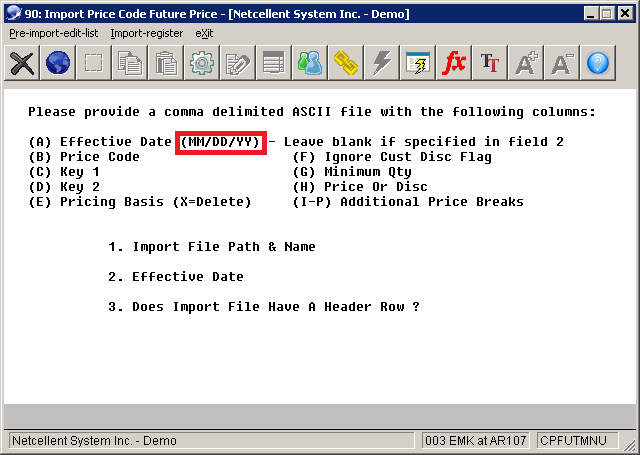
Q - Recently, I tried to import a future price code file through CSV. I saw that on the screen layout, it states the date format should be in the MM/DD/YY format. MM stands for the two-digit month. DD stands for the two-digit date. YY stands for the two-digit year. That is to say, for December, 18, 2018, the date value should be 12/18/18. See sample screen below:
But I have discovered that both MM/DD/YY and MM/DD/YYYY formats are supported. This is just FYI.
A - That is a nice bonus, isn’t it? As a matter of fact, with all CSV imports in Elliott, we support both MM/DD/YY and MM/DD/YYYY formats in the date field. We have to do this because we cannot guarantee what format the user will use.
EMK
Related Articles
Feature - Customer CSV Import
Release date: 9/25/2019 Version: 8.5 and up For the Customer CSV Import, select AR --> Utility --> Customer/eContact import --> customer/econtact Import --> Customer import This new screen program will have three menu options: Pre-Interface, ...Support Positive Pay CSV File Format in Accounts Payable
Release Date: 05/26/21 Revised Date: 03/15/22 Version: 8.5 & Up Positive Pay can send printed check information to the bank to prevent fraudulent checks (invalid check number or check amount) from being cleared by the bank. Elliott currently supports ...Common Issues with Importing CSV Files Into Elliott
Release Date: 12/18/2020 Version: 7.0 & Up Elliott Business Software has extensive features with CSV file export and import. It provides a gateway to view Elliott's data in Excel spreadsheets and optionally allow users to edit the data in ...Converting Elliott Internal Date to Conventional Date Format in Excel
Q - If I retrieve Elliott's data in Excel through ODBC, the date column is retrieved in an 8-digit numeric format like:20161231, where the first 4 digits are the years, the following 2 digits are the month, and the last two digits are the day of the ...Feature - Prevent MM Item from Purchasing
Release Date - 3/11/16 The purpose of this feature is to prevent an MM item from purchasing. MM item means the item's purchased or manufactured code is set to “M” and the item’s mostly purchased or manufactured is set to “M.” In the Purchase Order ...